Image to Image AI for Controlled Edits
Upload a reference image, describe what should change, and keep the parts that matter. Try Banana AI gives creators an image to image AI workflow for practical variants, campaign drafts, and polished edits with transparent credits.
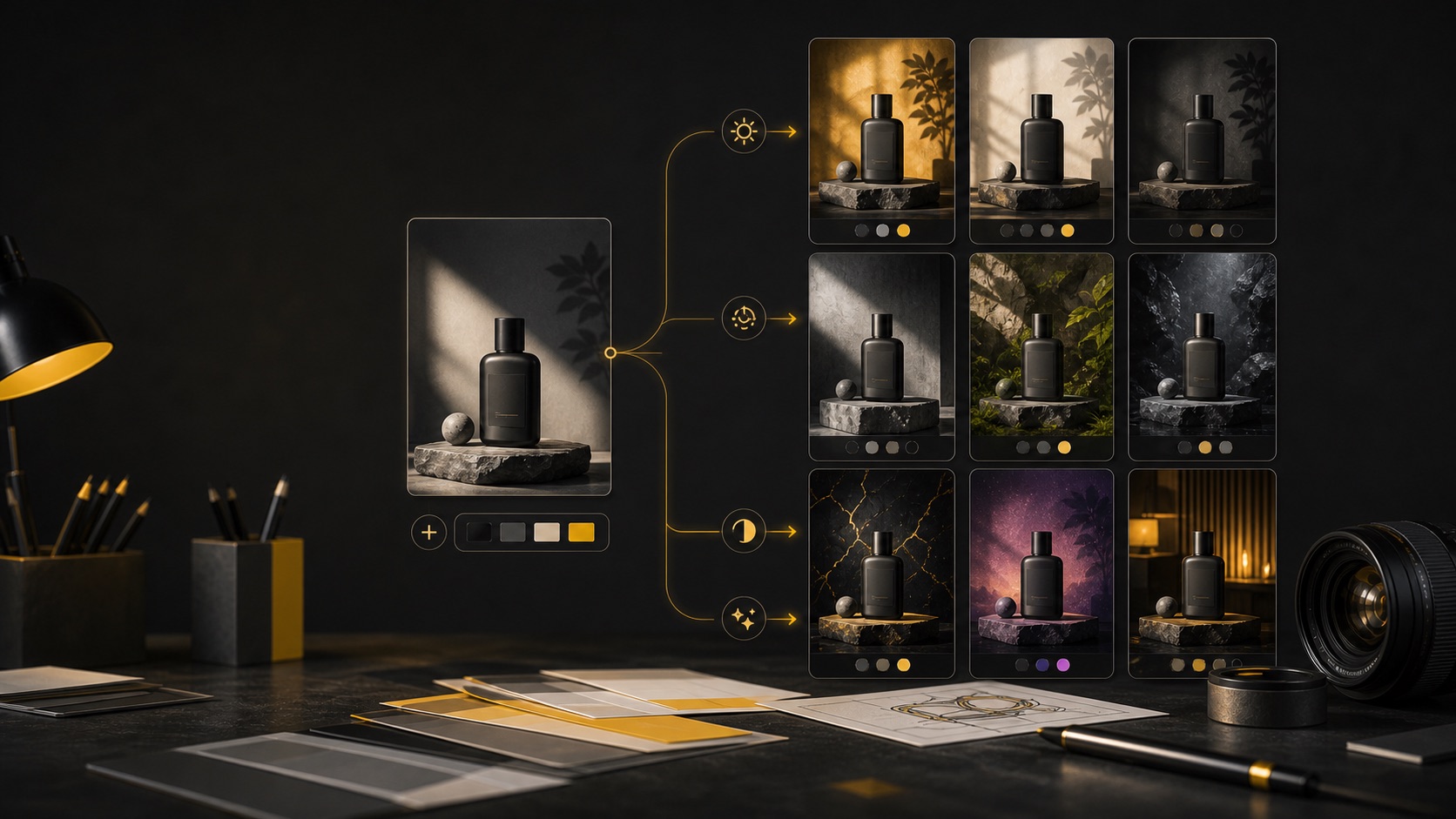
Image Generator
Prepare your reference edit
Choose a reference image and prompt before upload or credit use happens.
0 / 2000
Try a prompt:
What image to image AI is best for
Image to image AI is the workflow you use when a blank prompt is too unpredictable. Instead of asking a model to invent every detail from text, you give it a reference image and a focused instruction. The reference anchors layout, subject, color, or mood, while the prompt tells the model what should change. That makes image to image AI especially useful for real creative work. A product marketer may like the framing of a product shot but need a different background. A creator may have a strong thumbnail draft but want a sharper lighting style. A designer may need several campaign variants that keep the same composition while testing different palettes. In each case, the reference image reduces drift. Try Banana AI keeps this workflow simple. You can choose a reference image before sign-in for local preview, write your prompt, and continue only when you are ready to generate. The file is not uploaded during the preview step. Upload, generation, credits, saved history, and checkout attribution happen after sign-in. This keeps the first interaction lightweight while preserving the creative context you already selected. The result is a practical image to image AI page, not a settings maze. Pick the image tab, add a reference, describe what to keep and what to change, then use credits only when the action truly needs the model.
Preserve useful composition
Use a reference image to keep framing, subject placement, and visual rhythm while changing style, lighting, background, or details.
Move from draft to variant
Turn a good draft into multiple production directions without restarting from a blank prompt each time.
Preview before sign-in
Select files and write your prompt before login. The workflow restores your prompt and selected files when you continue.
Generate with clear credits
The paid action happens only when you generate. Presets show credit cost before the model starts.
Why creators choose image to image AI
A useful image to image AI workflow solves a different problem than pure text-to-image. It helps you keep what already works. That is the difference between random exploration and controlled production.
Less composition drift
Text-only prompts often change too much between attempts. Image to image AI lets you anchor the existing layout and ask for targeted edits, which is better for brand assets, ads, thumbnails, and product visuals.
Faster creative testing
Create variants with one controlled change at a time: background, color palette, lighting, surface texture, or mood. This makes visual A/B testing easier because every version still belongs to the same concept.
A better pre-login experience
For a low-maintenance tool site, the best login moment is not the first click. Try Banana AI lets visitors prepare a prompt and reference image locally, then asks for sign-in only before generation, saving, or credit use.
How to use image to image AI
Use this sequence when you want consistent edits instead of one-off outputs. The key is to separate what should stay from what should change.
Choose a reference image
Start with a strong source. It can be a product photo, draft poster, thumbnail mockup, character concept, or previous AI result. Before sign-in, selection stays local so you can prepare the workflow without uploading anything.
Write a keep/change prompt
The best image to image AI prompt is explicit. Use language like: keep the subject, framing, and product shape; change the background to a bright studio set; make the lighting softer; keep the logo area clean.
Generate after sign-in
When you click generate, the app restores your prompt, selected reference, active tab, and call-to-action context. Sign-in protects trial credits, abuse controls, saved history, and payment attribution.
Iterate with one variable
Change one thing per round. If the first edit has the right composition, keep the prompt stable and adjust only the palette or lighting. Controlled iteration is where image to image AI becomes more valuable than rerolling from scratch.
Image to image AI features
Try Banana AI focuses on the features that matter for a small creator workflow: reference-based editing, prompt restoration, transparent credits, and a clean generation path.
Reference image input
Choose reference images for controlled edits and preserve important visual structure.
Prompt and file restoration
If sign-in is required, the app restores your prompt, selected files, and active image-to-image state.
Local pre-login preview
Visitors can select images before login for a lightweight preview. Upload happens only when generation needs it.
Model and preset selection
Use a simple model plus preset workflow instead of provider-specific parameter fields.
Transparent credit cost
See the credit cost before generation so iteration stays predictable.
History and downloads
Generated outputs can be reviewed and downloaded from the same creator workspace.
Pricing
Start with a subscription or buy credits when you need them.
Starter
Includes
- 1,000 credits / month
- Advanced image + video models
- Image + Video generation
- Standard support
Creator
Includes
- 2,500 credits / month
- Advanced image + video models
- Image + Video generation
- Priority support
Agency
Includes
- 7,500 credits / month
- Advanced image + video models
- Image + Video generation
- Team-friendly usage
Image to Image AI FAQ
Answers about reference images, prompts, sign-in timing, credits, and how to keep edits consistent.
Start with a reference image
Use image to image AI when you want controlled edits, not random rerolls. Prepare your reference and prompt first, then generate when you are ready.