Nano Banana Image to Prompt for Reusable Prompt Ideas

Break down a reference image into a safe, reusable prompt structure: subject, composition, lighting, material, constraints, and the next edit. Use Try Banana AI to test the prompt with your own or authorized images, without claiming exact reconstruction or official model-provider access.

Use only images you own or are allowed to reference. This page is a prompt-writing workflow, not a private prompt recovery tool or an official Nano Banana API claim.

Image Generator

Test a reference-based prompt

Upload a reference you can use, then describe what to keep and what to change. Sign-in is only required before generation, saved history, or credit spend.

0 / 2000

Try a prompt:

Image to prompt works best as visual analysis, not copying

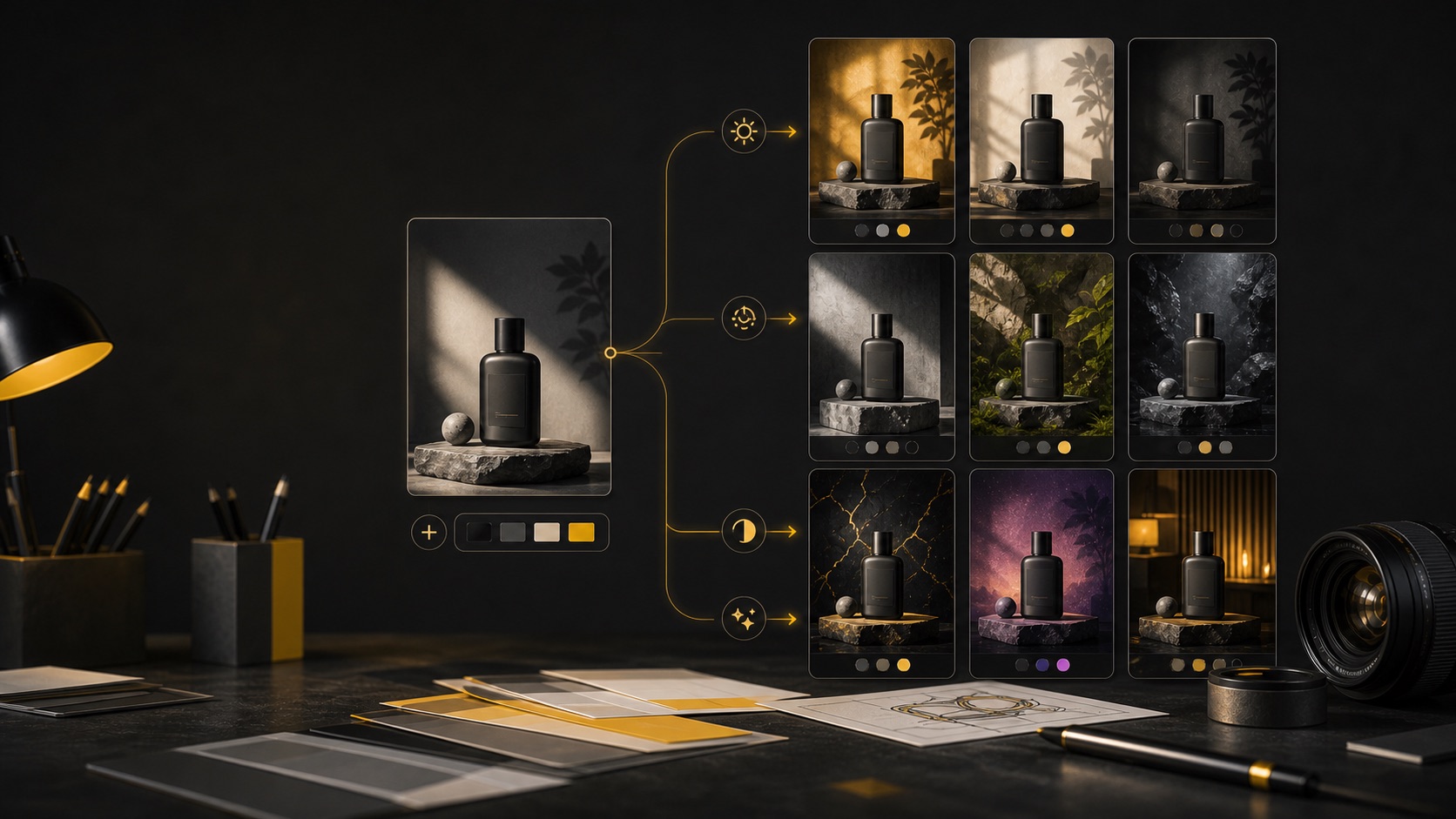
People search for nano banana image to prompt because they want to look at an image and understand what prompt could create a similar kind of result. The useful version is not guessing a hidden private prompt. It is a structured translation from visible image qualities into prompt clauses you can safely adapt: the subject, framing, lighting, background, texture, mood, aspect ratio, and edit instruction. Try Banana AI can help you test that structure in a creator workflow. Start with a reference image when you need a controlled edit, or move to text-to-image when you only need prompt ideas. The important boundary is that the page does not promise exact reconstruction, person identification, trademark replication, or access to a model provider's private prompt. It helps you write a clear prompt from observable, permission-safe visual details. That makes the workflow useful for product images, posters, thumbnails, wallpapers, original character boards, and creative variants. Instead of writing a vague prompt like "make it like this image," you can say what should remain stable, what should change, what should be avoided, and why the output will be used.

Read the image in layers

Separate subject, scene, crop, lighting, texture, palette, and output purpose before writing the prompt. This keeps the extraction useful instead of vague.

Preserve only what you can use

Keep allowed visual structure, not someone else's identity, protected mark, or exact brand style. Safe reuse focuses on composition and production choices.

Convert observations into prompt clauses

Turn "soft side light" or "wide negative space" into explicit clauses. The model needs instructions, not a memory of the source image.

Test the prompt in the right workflow

Use image-to-image when a reference matters. Use the normal image generator when the reference only inspired a new prompt idea.

The safe image-to-prompt formula

Use this formula to turn visible image details into reusable Nano Banana prompt ideas without overclaiming extraction or copying protected material.

Image role

Name the asset type: product hero, poster, thumbnail, wallpaper, concept art, reference edit, or campaign visual.

Visible subject

Describe the generic subject and pose. Avoid identifying private people, public figures, or protected characters from the source.

Composition

Extract crop, focal point, negative space, text-safe zones, camera angle, foreground/background relationship, and aspect ratio.

Light and material

Translate visible qualities such as softbox light, rim light, paper texture, glossy plastic, fabric weave, matte product finish, or haze.

Keep and change

For edits, state what must stay stable and what should change. This is more useful than asking the model to copy the whole source.

Safety constraints

Add boundaries such as no extra logos, no public-figure resemblance, no explicit content, no private data, and readable short text only when needed.

Extraction Patterns

10 safe Nano Banana image-to-prompt patterns

Use these patterns to convert visual observations into prompt ideas. Replace bracketed details with what you can safely use from your own or licensed reference.

Pattern 1

Product photo breakdown

For turning a product reference into a new store banner, ad draft, or catalog-style variant.

Reference breakdown: [product type] centered in frame, [surface material], soft diffused light from [direction], grounded shadow, realistic [material texture], clean background, preserve product silhouette and scale, change background to [safe new setting], no extra logos, no unreadable labels, 1:1.

It extracts the visible production setup while avoiding brand copying and unnecessary identity claims.

Adapt with

  • - surface: matte paper, stone, warm wood
  • - light direction: left softbox, window light, overhead glow
  • - output ratio: 1:1, 4:5, 16:9
Pattern 2

Poster layout extraction

For creating an original poster prompt from a layout reference without copying the original design.

Original poster concept inspired by a reference layout: large headline area at [position], [directional shape] guiding the eye, [two or three color palette], clear subject silhouette, high contrast, readable short text zone, replace all marks and names with original placeholders, 4:5.

It turns layout mechanics into a new brief instead of asking for a duplicate poster.

Adapt with

  • - headline area: top third, center, lower left
  • - motion cue: diagonal sweep, radial burst, grid blocks
  • - palette: teal and cream, black and yellow, blue and coral
Pattern 3

Thumbnail composition prompt

For reverse-engineering a strong 16:9 thumbnail structure into a safe new thumbnail idea.

Thumbnail prompt from visual analysis: close original subject on [side], strong contrast against [background type], short text-safe area on [side], expressive but non-identifying face or object, bold readable shapes, clean edge separation, no copied logo or public-figure likeness, 16:9.

It focuses on thumbnail readability and safe composition rather than copying a person or channel style.

Adapt with

  • - subject side: left, right, center crop
  • - background: gradient, room, abstract burst, product scene
  • - text zone: right third, top band, bottom block
Pattern 4

Reference edit keep/change

For image-to-image edits where the source image is yours and you want a controlled variant.

Use the uploaded reference as composition guidance. Keep [subject shape], [camera angle], and [main layout] unchanged. Change [specific element] to [new safe detail]. Preserve realistic lighting, clean edges, and natural material texture. Do not add extra people, logos, or explicit content.

The prompt separates preservation from change, which is the core of controlled image-to-image editing.

Adapt with

  • - keep: silhouette, crop, pose, room layout
  • - change: background, color, prop, season, texture
  • - constraint: no extra text, no extra objects, no brand marks
Pattern 5

Moodboard to prompt

For using a reference board as inspiration without copying any single image.

Create an original [asset type] using moodboard notes: [mood], [palette], [material cues], [composition pattern], and [lighting]. Do not copy any specific image, logo, character, or artist style. Produce a clean, usable concept with [output purpose] in mind.

It converts a collection of visual cues into an original creative direction with clear boundaries.

Adapt with

  • - asset type: poster, product image, wallpaper, social ad
  • - mood: calm, premium, playful, cinematic
  • - output purpose: landing hero, campaign draft, story cover
Pattern 6

Material and texture extraction

For preserving the tactile feel of an image while changing the subject or setting.

Prompt idea from texture analysis: [subject] with [visible material qualities], [surface detail], [light behavior], and [color temperature]. Keep the tactile feel of [texture], but create an original scene in [new setting], realistic details, no copied product labels, 1:1.

It captures reusable material language, which is often what makes a reference feel consistent.

Adapt with

  • - material: brushed metal, frosted glass, woven fabric, matte ceramic
  • - light behavior: soft reflection, rim highlight, gentle shadow
  • - setting: studio table, desk, kitchen, outdoor shade
Pattern 7

Background replacement prompt

For keeping a subject while building a cleaner, safer background idea.

Reference-based background change: keep the main [subject] position and camera angle. Replace background with [new environment], match light direction and shadow softness, keep subject edges natural, remove clutter, no visible brand marks, no unrelated people, commercial-ready composition.

It narrows the edit to background, light matching, and edge quality, which makes the result easier to judge.

Adapt with

  • - environment: gradient studio, kitchen counter, desk, minimal set
  • - light match: left window, overhead softbox, warm sunset
  • - cleanup: remove cables, clutter, extra text
Pattern 8

Character board observation

For original character concepts where you want consistency without copying an existing person or protected character.

Original character concept from visual notes: [generic role], [silhouette], [color palette], [clothing category], [pose], [background mood]. Keep proportions consistent across variations, avoid public-figure resemblance, avoid protected character details, clean concept art sheet, 3:4.

It extracts broad design choices while explicitly avoiding identity and IP copying.

Adapt with

  • - role: explorer, chef, student, shop owner, musician
  • - silhouette: rounded, angular, tall, compact
  • - output: portrait, full-body sheet, avatar crop
Pattern 9

Ad visual prompt extraction

For learning why a reference ad works and creating a new safe ad concept.

Original ad visual prompt: [product or offer category] as the focal point, [benefit] shown through [safe scene], [composition cue] for attention, [palette], clear CTA space, no copied slogan, no brand imitation, no unlicensed logo, polished campaign draft, 4:5.

It transforms ad structure into a new marketing asset instead of duplicating creative or legal details.

Adapt with

  • - benefit: portability, comfort, freshness, speed
  • - composition cue: spotlight, diagonal line, frame-within-frame
  • - CTA space: top band, bottom card, right column
Pattern 10

Prompt idea from failed output

For turning an AI result that almost worked into a clearer next prompt.

Revision prompt from previous output: keep [successful element], fix [failure], reduce [unwanted detail], improve [quality target], preserve [composition], add [one new safe detail], no extra limbs, no unreadable text, no copied marks, generate a cleaner variant.

It treats prompt extraction as iteration: identify what worked, what failed, and the smallest safe change.

Adapt with

  • - successful element: pose, palette, lighting, product angle
  • - failure: clutter, wrong crop, text artifacts, low contrast
  • - quality target: sharper edges, cleaner background, realistic texture
Prompt cleanup

Turn vague image-to-prompt requests into usable prompts

A strong prompt extraction brief names what can be observed and what should be changed. These rewrites show the difference.

From copying to composition

Weak request

Make an image exactly like this reference.

Better prompt

Use the reference only for composition: centered product, soft left-side light, clean background, realistic texture. Create a new original product scene with no copied labels or logos.

The better version turns the source into safe visual instructions and removes exact-copy language.

From hidden prompt guessing to visible details

Weak request

Extract the real prompt behind this image.

Better prompt

Write a prompt from visible details: close crop, warm rim light, muted blue background, shallow depth of field, subject on the left, text-safe space on the right.

No tool can honestly promise a private hidden prompt. Visible detail extraction is the useful and safer task.

From identity risk to original subject

Weak request

Make this portrait copy a real person's identity and look.

Better prompt

Create an original non-identifying portrait with similar lighting direction, neutral expression, warm studio background, and clean editorial framing.

The rewrite avoids public-figure likeness and focuses on permitted visual qualities.

Safe boundaries for prompt extraction

Image-to-prompt workflows are strongest when they respect source rights, user privacy, and generation rules. Use the reference as a teaching object for composition and production choices, not as permission to recreate protected or sensitive content.

Use authorized references

Work with images you own, have licensed, or are otherwise allowed to use. Do not upload private or sensitive images without permission.

Avoid identity extraction

Do not write prompts that identify, imitate, or manipulate real private people, public figures, or protected characters.

No adult or unsafe prompts

Do not turn images into adult, explicit, exploitative, deceptive, or safety-bypass prompt instructions.

Treat blocks as useful feedback

If an input or prompt is rejected, rewrite the goal into a safer visual task instead of trying to evade moderation.

How to turn an image into a better prompt

Use this workflow before you spend credits on variants. It helps you isolate the useful parts of a reference and test one change at a time.

1

Choose a usable reference

Start with an image you are allowed to use. Decide whether it is a product reference, layout reference, mood reference, or edit source.

2

Write observations before instructions

List the visible subject, crop, lighting, palette, texture, depth, text zones, and quality problems. This prevents vague copy requests.

3

Convert notes into keep/change clauses

For image-to-image, specify what should remain stable and the one edit you want. For text-to-image, use the reference as inspiration only.

4

Add safety and quality constraints

Remove identity, brand-copy, adult, or unsafe requests. Add useful quality constraints such as no extra logos, readable short text, clean edges, or natural shadows.

5

Generate a baseline

Run the prompt once before changing multiple variables. If the result is close, iterate on one detail such as background, lighting, crop, or color.

6

Save the reusable prompt

When a prompt works, save the structure. Replace only the subject, setting, or output ratio next time to create a prompt idea library.

Pricing

Start with a subscription or buy credits when you need them.

Sign in first, pay afterCheckout only starts after your account is ready.
Secure Creem checkoutPayment opens on the provider checkout page after sign-in.
Plans or top-upsChoose monthly credits or a one-time pack when a draft needs more.
Credit packs last 90 daysTop-ups stay available for image and video generation.

Starter

$19.90 / month
For light usage and trying things out.

Includes

  • 1,000 credits / month
  • Advanced image + video models
  • Image + Video generation
  • Standard support
Most Popular

Creator

$39.90 / month
Best for creators who generate every day.

Includes

  • 2,500 credits / month
  • Advanced image + video models
  • Image + Video generation
  • Priority support

Agency

$99.90 / month
For teams and heavy usage.

Includes

  • 7,500 credits / month
  • Advanced image + video models
  • Image + Video generation
  • Team-friendly usage

Nano Banana Image to Prompt FAQ

Answers about prompt extraction, reference images, safety, credits, and how to reuse prompt ideas.


Turn a reference into a safer prompt

Use Try Banana AI to test reference-aware prompt ideas, then save the structure that gives you the most controllable results.